Choosing a 70-watt GPU.
Part 5 · the GPU
The RTX 3060 Ti did its job, but its 8 GB of memory capped what the lab could run locally. I wanted to host my own models for coding help and general experimenting, in the 20-billion-parameter-plus range, without sending everything to a cloud API. This is how the replacement was chosen, under a power budget that ruled out most of the obvious answers.
VRAM IS THE LIMIT THAT MATTERS
A language model runs fast only when its weights fit in GPU memory. On 8 GB, quantised models above roughly 7 to 13 billion parameters either refused to load or spilled into system RAM and crawled. A faster GPU with the same 8 GB would not have helped; more memory would. The goals:
- Run larger quantised models, around 20B and up, as a daily driver.
- Stay inside the machine's real power limits, with no new power supply.
- Leave room for a second card later.
THE POWER BUDGET
The Precision 7810's power supply is about 825 W, and it never needed replacing: total wattage was not the problem. The problem was cables. The 3060 Ti was fed by a single 8-pin PCIe lead, about 225 W with the slot. Any card wanting two or three 8-pin leads was off the table unless the power supply changed too. That one constraint shaped the whole search.
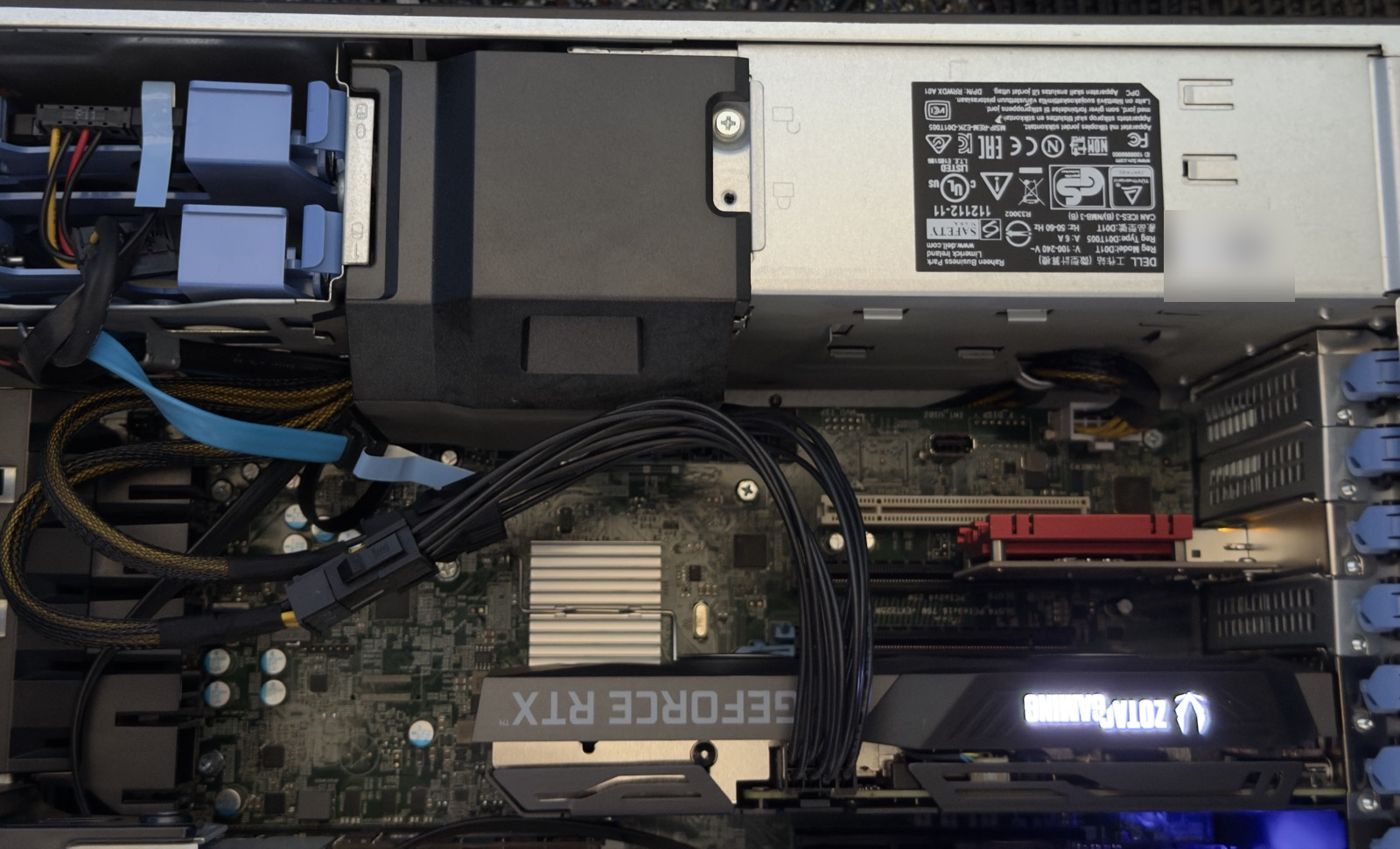
WHAT THE CURRENT CARD DRAWS, AND HOW IT IS CONNECTED
nvidia-smi -q -d POWER | grep -E 'Power Draw|Power Limit'
# the slot it sits in: is it running at full PCIe width?
sudo lspci -vv -s $(lspci | awk '/NVIDIA/ && /VGA|3D/ {print $1; exit}') | grep -E 'LnkCap|LnkSta'
THE CANDIDATES
Prices are what we found shopping in early October 2026.
| CARD | VRAM | POWER | PRICE | VERDICT |
|---|---|---|---|---|
| RTX 3090 | 24 GB | 350 W, two 8-pin | $1,200–1,800 used | over the single-lead budget |
| RTX A5000 / A4500 | 24 / 20 GB | 230 W, one 8-pin | hard to find | ideal fit, no live listings |
| Tesla P40 | 24 GB | 250 W, adapter + cooling | ~$280 | cheapest, but a project |
| Tesla V100 PCIe | 32 GB | 250 W, EPS-style | ~$780 | great value, no video out, adapter |
| RTX A4000 | 16 GB | 140 W | $790–950 used | clean fit, older generation |
| RTX PRO 4000 Blackwell | 24 GB | 70–145 W | ~$3,000 | out of budget |
| RTX PRO 2000 Blackwell | 16 GB | 70 W, slot only | $1,300 new | chosen |
WHY THE PRO 2000
- No power cable at all. At 70 W it runs entirely from the PCIe slot, so the single-lead limit stopped mattering.
- A current generation. Blackwell brings newer tensor cores with FP8 and FP4 support, formats modern quantised models increasingly use.
- New for the price of used. Used Ampere cards with similar memory cost about the same, so a new card with a warranty was the better buy.
- A second one fits. Two cards draw about 140 W together and would give 32 GB across both.
One honest caveat: Blackwell workstation cards have no NVLink, so a second card would talk to the first over PCIe. For inference, where a model is split by layers across cards, that is fine. It will not pool the two memories into one.
Several listings were overseas sellers on eBay, and US retailers had the same card at $1,630 to $1,700. We bought from a US store with in-store pickup at $1,300 plus about $140 California sales tax, to avoid import and warranty risk. The old 3060 Ti is worth roughly $250 resold.
THE SWAP
On 7 October 2026 the new card went into the same slot. The host restarted a few times before it settled, then came up and recognised the card as an RTX PRO 2000 Blackwell.
ON THE PROXMOX HOST: DID IT COME UP?
lspci | grep -i nvidia
dkms status                  # nvidia/595.80, <kernel>-pve: installed
nvidia-smi --query-gpu=name,memory.total,power.limit --format=csv
The driver is installed with DKMS so it rebuilds itself for each new Proxmox kernel. The host keeps the card; containers borrow it. How that works, and what 16 GB actually runs, is part 6.
ASK AN AGENT
PROMPT: CHOOSE A GPU FOR LOCAL MODELS UNDER REAL CONSTRAINTS
Help me choose a GPU for running local LLMs on this machine.

Constraints: read them from the machine where you can (PCIe slots and link widths, power connectors in use, case clearance if documented for this model), and ask me for anything you cannot read, such as the PSU's wattage and spare cables. Budget: [your budget]. Target: [the model sizes you want to run, and the context length].

For each candidate: VRAM, power and connectors, physical size, new and used price where I live, and whether it fits every constraint. Say what each one can run at my target context, with the quantisation, and show the memory arithmetic. Recommend one, and say what would change the answer.
THE SERIES
- It started with a Raspberry Pi
- One Ubuntu box and a macvlan network
- Moving to Proxmox, one service per container
- Four cores to sixteen
- Sixteen days of backups that weren't
- Choosing a 70-watt GPU
- Twelve cores and most of a GPU
- Building the lab with an agent in the loop
- One GPU, three containers, one owner
- From a browser kiosk to a 3 MB TUI